
TrueClicks MCP
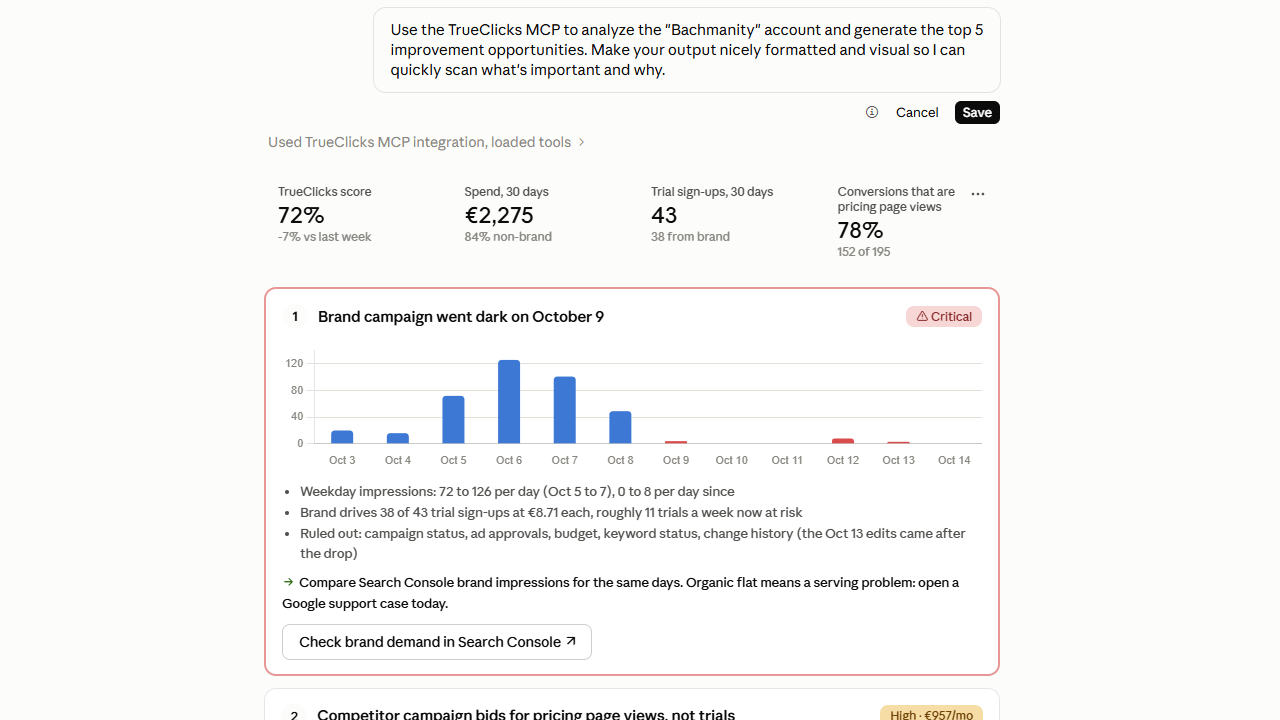
AI tools are great at explaining your accounts and unreliable at calculating them. The TrueClicks MCP, our connector for AI tools, gives Claude, ChatGPT, or Copilot the results of 150+ checks TrueClicks already ran, plus live Google, Microsoft, and Meta Ads data.
Works with the AI tools your team already uses






The analysis is already done when your AI asks
Point an AI tool at raw ad data and it decides for itself what good looks like, then does the math on raw rows. That's where answers go wrong. With the MCP, it reads findings TrueClicks already calculated and does what these models are actually good at: summarizing, ranking, and explaining, in seconds.
An LLM can attempt n-grams, but it's slow, unreliable at scale, and easy to get subtly wrong. TrueClicks has already run them across your whole account.
An LLM can't crawl your landing pages and check HTTP status codes. TrueClicks does, so your AI just reports the result.
Budget-capped campaigns, negative keyword conflicts, pacing against target, triggered alerts. TrueClicks runs them on a schedule, and the MCP surfaces the ones that matter for your question.
On raw data, the AI picks its own threshold every time, so this month's answer won't reconcile with last month's. TrueClicks findings are calculated the same way every run.
Your Monday account check, in one question instead of 30 open tabs
Name the account, the date range, and the metrics. The sharper the question, the sharper the answer.
.svg)
“Show the campaigns that failed the most audit rules for account X, worst first.”
“Which search-term n-grams are wasting the most budget across all my accounts?”
“List and prioritize the audit findings I can fix today in under an hour.”
“List any landing pages returning errors across my accounts.”
“Which performance alerts fired this week, and what’s behind them?”
“What’s still open across all my accounts?”
“Which accounts are off pace this month, and which of them have critical audit issues?”
“Which accounts are off their CPA or ROAS target this month?”
“Which campaigns are capped by budget right now?”
“Why did conversions drop last month, and which campaigns contributed most?”
“Summarize the key performance changes and open issues I should raise in my next QBR.”
“Spend and results by campaign for the Meta account linked to X this month.”
Google, Microsoft, and Meta Ads MCPs built in
No separate MCP per platform to set up and maintain. TrueClicks and all three ad platforms come through one connection, so one conversation can cover all of them.
Any performance or entity data you'd report on, by campaign, ad group, keyword, and search term, over any date range. Plus the results of every TrueClicks Google Ads check.
All performance data, plus account and campaign configuration. Plus the results of TrueClicks' Microsoft Ads checks.
All performance and insights data per account, next to your search data in the same conversation.
Built for teams running their own AI stack
Connecting takes minutes. What you build on top is up to you. Every other source tells you what happened. TrueClicks tells you whether it's a problem.
Ask once and get the answer across every account you manage. Because the findings are already calculated, a hundred accounts is fast.
Your TrueClicks client labels come through, so one question can cover everything you run for a client.
Schedule a portfolio sweep in n8n or Make. It works through every account, digs into the ones that look wrong, and leaves you a shortlist instead of thirty reports.
Put your CRM, margin sheets, and analytics next to TrueClicks in the same AI tool. That's the data that decides whether a conversion was worth having.
Put the heavy, repetitive jobs on the AI subscriptions your team already has, where the spend is already committed.
If IT has standardized on Copilot, that's where TrueClicks goes. You build inside the rules you already have instead of asking for an exception.
TrueClicks AI Assistant or TrueClicks MCP?
Same data, same subscription, two ways of working. One asks nothing of your team; the other is yours to build and keep running. Pick one home, though: skills and memory don't travel between the two, so a split team builds two sets of context that never meet.
Someone senior wants to own the stack, and will still want to in a year
Your analysis needs your CRM, analytics, or margins to mean anything
Reports have to land in Slack or a sheet on a schedule
Your company only runs AI tools it has already approved
You also want to analyze cross-account, as well as one account at a time
Connect the tool you already use
Chat tools log in with your TrueClicks account. Automation tools use a data connector key. Each guide has the full steps.
Listed in Claude's connector directory. Click Connect, log in to TrueClicks, done. No URL or token. On Team and Enterprise, an Owner adds it once and everyone logs in with their own account.
Read-only by design
Your AI can see what you can see. It can't touch any of it.
Every tool is read-only. The MCP can't edit, pause, or change anything in TrueClicks or your ad platforms.
With OAuth, each person logs in with their own TrueClicks account and reaches exactly the accounts their access allows. Nothing is shared between teammates, even when an admin adds the connector for the whole organization.
Scope a data connector key to one client label, and a workflow only ever touches that client's accounts. Leaked a key? Delete it in TrueClicks and it stops working.
Frequently asked questions
All of them, including the free plan and trials. There's nothing extra to pay TrueClicks. You only need a plan for your AI tool that supports connectors.
Claude (web, desktop, and Claude Code), ChatGPT, Microsoft 365 Copilot, Gemini (through Antigravity), n8n, and Make. Any other tool that supports MCP connectors over streamable HTTP works too.
From TrueClicks: audit results (by account, rule, and campaign, with history), monitoring errors, performance alerts, budget pacing and targets, tasks, and your accounts and labels. From the ad platforms: live Google Ads, Microsoft Ads, and Meta Ads performance data. It only reaches accounts you already have access to in TrueClicks.
No. Every tool is read-only. It's for reporting and analysis.
Keep it for quick lookups. It hands your AI raw Google Ads data, so the model still decides what good looks like and does every calculation itself. The TrueClicks MCP adds the results of 150+ checks, audit history, and pacing, covers Microsoft and Meta Ads in the same connection, and logs in with OAuth, so it works on Claude Team and Enterprise.
Yes. An Owner adds the connector once for the organization. Then each member connects with their own TrueClicks login and sees only their own accounts.
No. Connecting takes minutes. Building something your team can rely on doesn't: someone has to own it, keep skills and memory shared, watch the token bill, and catch it when a model or API change quietly breaks a number. If nobody on your team wants that job, the AI Assistant is the better home.
